
ANKO
Ro-Ro & Passenger
Functions and Features
- Interactive graphical profile and plan views of the vessel and compartments
- Display of the actual loading condition and calculated results on the vessel plans
- Cargo densities, definition and conversion
- Tanks Loading by Sound, Ullage, Weight, Volume or Percentage
- Stores and Provisions loading
- Full validation of user inputs
- Free Surface Moments
- Constants modification
- Loading Summary
- Various items/weights such as, passengers and their effects, vehicles and so on, loading on the basis of:
- Weight
- Length (extension of weight)
- Position of their aft or force end
- VCG
- Interactive graphical loading (drag & drop), and loading in list
- Distances by frame number or in local co-ordinates, for example, distance from tank-top or from deck
- Graphical indication of position and length of the loaded weight, on the vessel's plans and profile views
- Definition of typical vehicle types and their weight, dimensions and VCG properties
- Designated car loading areas, marked on all car decks
- Interactive cars and passengers loading (drag & drop) on the actual vessel plan. Automatic estimation of marked area in m2 /ft2 and car size equivalent units
- Stability Analysis
- 2D or 3D hull model, depending on the loading manual method
- GZ-Theta graphical stability curve
- IMO Criteria, automatic selection as per load type
- Error messages, warning and safety critical (Stability, Strength, Free-board)
- Longitudinal Strength, graphical and interactive read-out at any frame
- Trim Check
- Draft zones selection and adjustment
- Storage and retrieval of unlimited number of loading conditions
- Metric, British or mixed system of units and automatic units conversion
- Print outs or complete reports. Text and graphical output
- Import/export of loading conditions. Export conditions by e-mail
- On-line help
General Cargo (2D)
- General Cargo loading either in holds or on deck
- “Free Weights”, that is, weights either on-board or outside the vessel
- Crane Operation: Strength/stability calculation, 3D hull model (trim, heel and free-trim effect taken into account)
Auto Trim
Modification of the contents of one compartment or transfer of load between compartments, to achieve the required trim.
Vessel Particulars
Displays useful information of the vessel, such as tank/hold, deck, machinery details, consumption and so on.
On-Line Interface to Tank Level Gauging System
This module of ANKO provides the necessary components for interfacing to all known Tank Level Gauging Systems.
To this effect, the communication protocol provided by the tank level gauging system manufacturer for the specific vessel, is implemented.
The on-line readings automatically update the tanks' loading status (Ullage/sound, volume, Temperature), the vessel's floating position, strength and stability are calculated and when required, parameters are transmitted back to the gauging system.
The whole process is interactive. The user, at any time, has an overview of tanks' flow rates, time to reach high or load level settings as well as the vessel's status.
If a strain gauging system is installed, ANKO will read the measured stresses and display them against the calculated ones.
Bar Chart View
In the on-line mode an alternative window is provided that displays the tanks' contents and other useful information in a graphical bar chart view. High and low level alarms are user defined and clearly displayed on the bar chart view together with the actual tanks content level. Audible and visible alarms are built in with the option to mute as required.
Bunkering
Provides complete pre-bunkering, post-bunkering and comparative summary calculations and reports. Trim, heel and temperature corrections are applied. Averaging of densities and sulphur content per tank are accounted for.
The user inputs initial and final ullages or soundings of FO, DO, LO tanks at a specified trim and heel, at which measurements have been taken. The system corrects the input ullages for Trim and Heel, as well as for temperature variation. The calculated corrected ullages can optionally update the active loading condition of the vessel.
Both Initial and Final bunker surveys are available.
The bunkering module takes into account:
- Density variation due to mix of different densities in tanks
- User-defined High/Low limit for sulphur content percent
- High & Low sulphur, percent sulphur content adjustment, due to mix of fuels in tanks
- Consumed fuel or diesel during bunkering and other useful information
Bunkering report is produced in EXCEL© format.
Draught Survey
Based on the readings at the draft marks, it calculates the loaded cargo or the vessel constants. Corrections are made for Trim, Hogging/Sagging and Sea Water Density.
Provides two modes of operation:
- Before Loading: Calculates actual constants and OBQs and their LCG
- After Loading: Calculates the cargo loaded
A combined Initial and Final draft survey version is also available to enable comparative display and printing of Before and After Loading draft survey results.
Air Drafts
Air drafts are calculated and displayed on any number of predefined longitudinal positions.
Air drafts are are also calculated at the side of the hatches.
Visibility Check
This module performs a visibility check, as per the SOLAS Reg. 22a.
The 2D version calculates and graphically displays the invisible length.
The 3D version carries out detailed geometrical calculations and graphically displays both the invisible length and the blind and clear visibility sectors.
Calculations take into account the actual shape of any obstacle, such as loading gear, container or other deck cargo. Furthermore, calculations are made for the loading condition that is the actual trim, heel and draft of the vessel Additionally, it checks invisible lengths for Panama and Suez canal navigation.
The view point can be on the center-line, or be moved transversely. In addition, trim heel and draft can be modified interactively so that the visibility for alternative loading conditions may be examined.
In ballast exchange operations, the visibility is checked in the background and a warning is displayed, if needed.
Deadweight Scale - Parallel Middle Body
Given the:
- Sea water density
- Trim
- DWT, Displacement or mid draft
This module calculates and displays drafts at PP and marks, DWT and displacement, as well as a number of important hydrostatic parameters.
In addition, the parallel middle body (PMB) and the distance of aft/fore ends of the PMB from amidships are also calculated and displayed.
Vessel Particulars and Plans
Displays vessel particulars. Furthermore, enables addition of any number of ship-related files by the client, including ship's drawings. The added files are automatically identified by the software and added in the list of items that the end-user can select for display.
The General Arrangement, Capacity Plan and Mid-ship Section, are included as a standard in the initial software delivery.
Additional drawings can also be included, subject to agreement.
PDF Export
This facility provides a custom PDF printing driver, and allows saving any print out to a PDF file, a format suitable for electronic transmission.
Appending pages to an existing PDF file is supported. This option is useful in case there are no other PDF drivers installed.
SAFESALV - Emergency Response
SAFESALV is an advanced system for the immediate assessment of Damage/Grounding vessel conditions and the evaluation of alternative salvage scenarios. SAFESALV provides all those facilities which allow the on-line interactive examination of What If scenarios, making it a powerful decision support tool.
The SAFESALV system is used for Emergency Response.
In SAFESALV the user defines the initial loading condition and indicates the damage on the vessel, working on the actual vessel plan. In case of grounding or combined damage and grounding, the measured draughts at selected points around the vessel, as well as the type, and optionally the extent, of grounding, are input.
As soon as the damage is specified, the floating position in the damaged condition is found. The IMO damage stability criteria are checked and the stresses exerted on the ship’s structure are calculated. User inputs and calculated results are graphically displayed.
Flooding
The cargo permeability can be set by the user. For partially filled holds with bulk cargo, calculation of the combined permeability is carried out. In particular, the system considers the loaded and free space of each hold with different permeabilities. Depending on the calculated in-flooded water level, the combined permeability is found and accounted for.
The damage calculation is based on either liquid surfaces parallel to the waterline or, optionally, on frozen surfaces. Damage conditions can be stored and complete reporting is available.
Marginal points are displayed graphically. In the print out the calculated actual Free-board and Immersion angle at each marginal point are shown.
Cargo Shift
Given the heel of the vessel, the shifted cargo TCG is adjusted so that the calculated heel matches the observed.
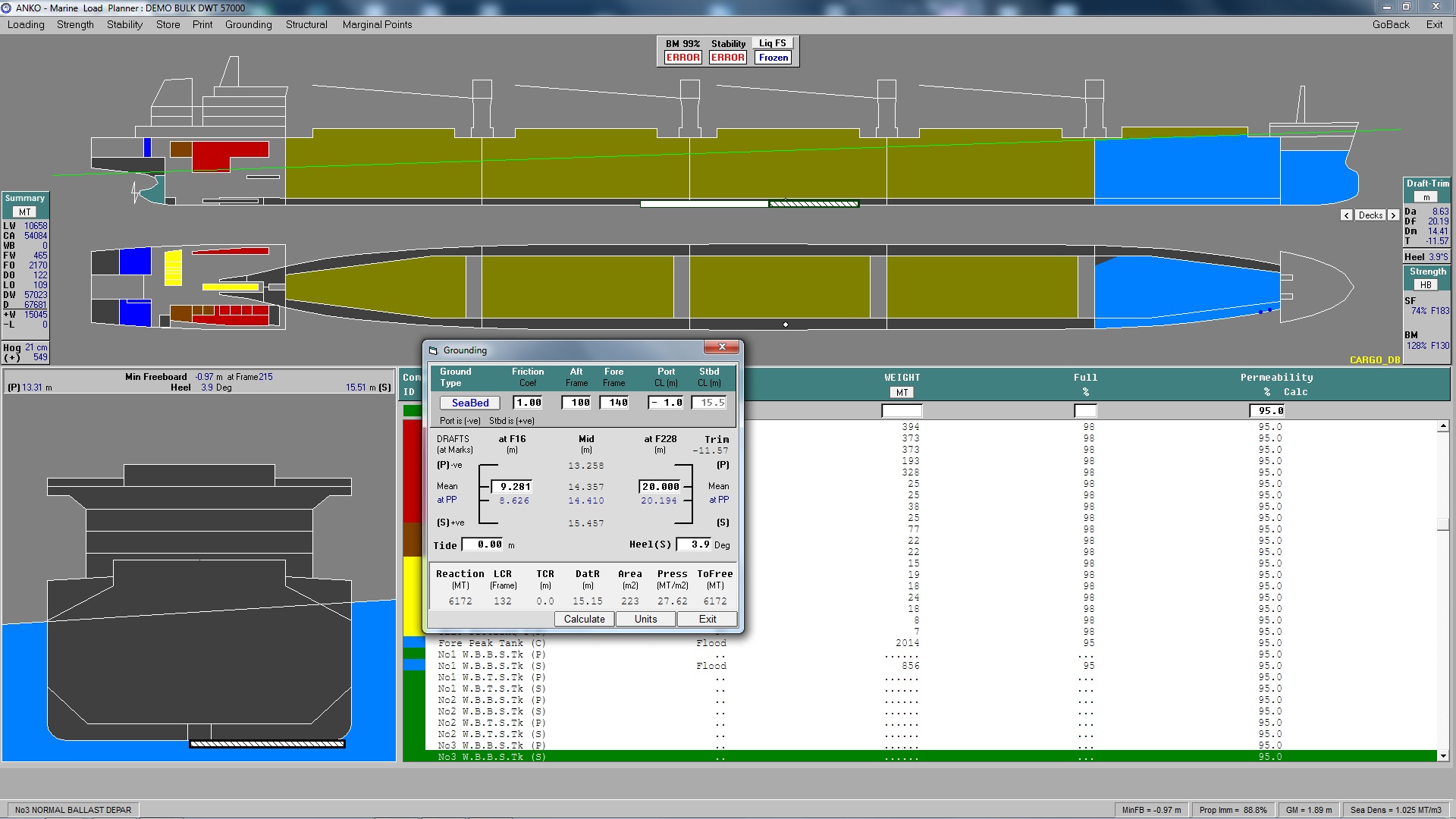
Grounding Calculations
Grounding and re-floating calculations include:
- Grounding area
- Grounding force and position
- Force required to free the vessel
- Pressure on grounded area
Different types of grounding, that is, on One Pin, Two Pins or Seabed can be examined. Tide can also be defined and taken into account.
Off-line interactive evaluation of corrective actions/scenarios can be carried out.
Simultaneous flooding and grounding is supported by SAFESALV.
Residual Strength
Grounding and re-floating calculations include:
Provides an estimation of the effect of the structural damages on vessel's strength. The position and extent (in terms of length, breadth and depth) of the structural damages are given by the user. The residual strength is estimated by re-definition of the permissible bending and shear stresses after the structural damages.
Note: SAFESALV is also available as a Stand-Alone Tool.

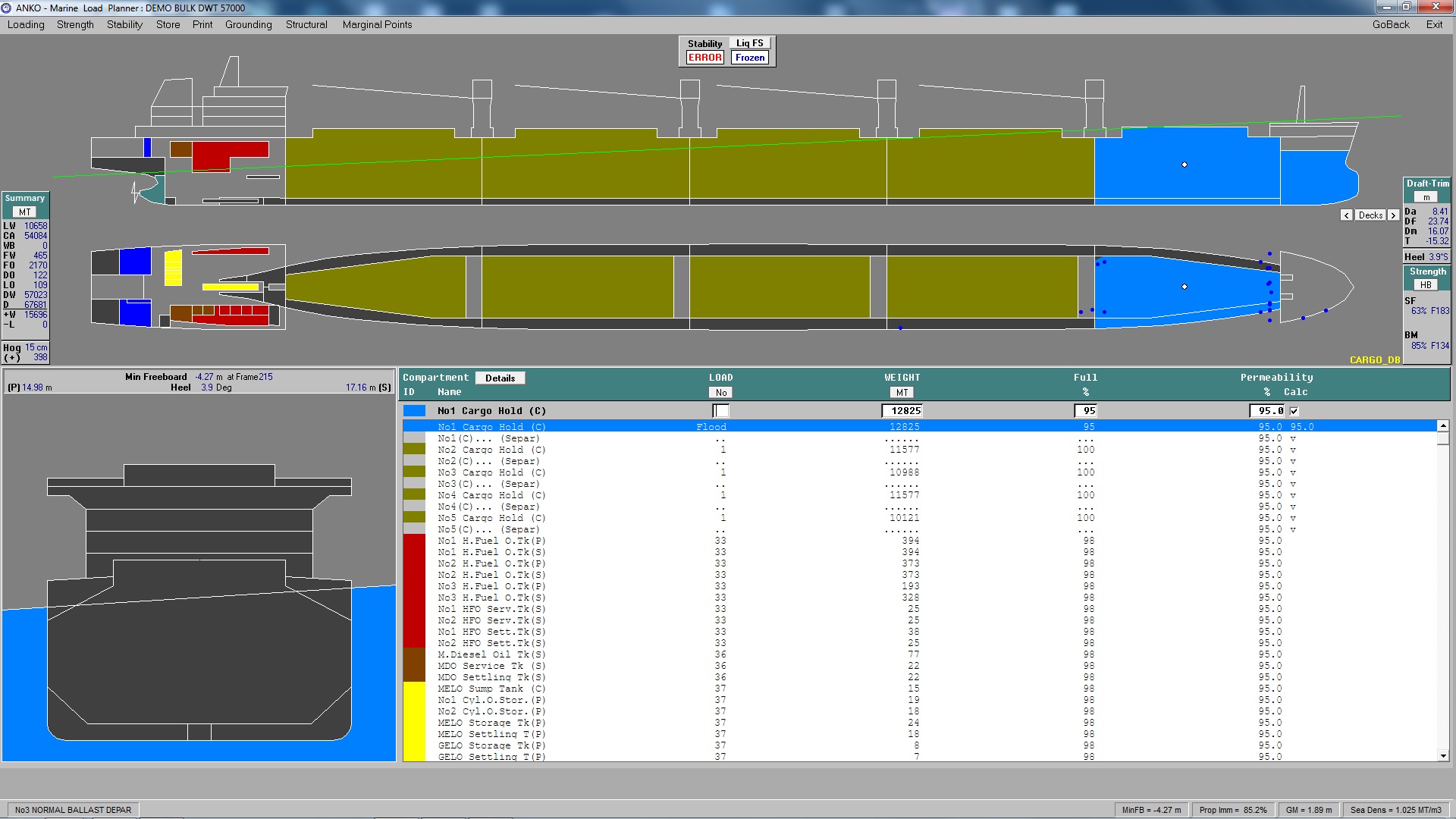
Damage Stability Check & Flooded Hold Strength (IACS URS17)
This module carries out a complete damage stability calculation of the loading condition of the vessel as per IACS URS17 requirements for ships carrying cargo in bulk.
The vessel is checked by default for a number of built in damage cases where, as specified by IACS URS17, each hold is damaged separately. Additional damage cases can be interactively defined.
The stresses of the flooded vessel are checked against pre-specified "flooded" strength limits. The cargo permeabilities can be interactively modified.
A complete Damage Check report is produced.